Translate PDF Online — PDF Translator, Layout & Scanned Pages
PDF translator: translate PDF online while keeping layout, tables, and formulas — including scanned pages. Translate to English and 8 other languages.
Upload PDF File
Drag & Drop files here, or
PDF only, Max 300MB, Max 800 pages
Your files are protected with strict privacy safeguards. Privacy policy
Settings
Points Deduction Info
- • Translate PDF:2 pts/pg
How layout-preserving PDF translation works
KolmoPDF preserves the original document layout throughout the translation process. Page hierarchy, column structure, formulas, and inline symbols remain intact in the translated output, instead of reducing the document to plain text before translation.
- Supported languages: English, Chinese (Simplified), Japanese, Korean, French, German, Spanish, Russian, and Portuguese. Any pair between these 9 languages.
- Formula handling: Mathematical expressions are recognized and restored after translation, not translated literally.
- Image translation (OCR): Enable image translation to translate text inside charts, screenshots, and diagrams embedded in the PDF.
- Output options: Translated only, or bilingual output with original and translated text side by side.
- Credit cost: 2 credits per page, regardless of language pair.
PDF files only. Maximum file size: 300 MB. Maximum page count: 800 pages.
AI PDF translator that keeps your layout
Translate PDF documents online into 9 languages while preserving the original layout, page hierarchy, formulas, and inline symbols. Unlike Google Translate’s document mode, KolmoPDF rebuilds each page so bilingual reviewers can compare paragraphs side by side without losing tables, figures, or equations — including on scanned PDFs.
Key capabilities
- Preserves page structure, headings, table positions, and figure captions.
- Restores inline LaTeX symbols and display equations after translation.
- Bidirectional translation across English, Chinese, Japanese, Korean, French, German, Spanish, Russian, and Portuguese.
- Maintains code blocks and identifier tokens untouched.
- Outputs a downloadable PDF that mirrors the source pagination.
Common use cases
Research labs translate foreign-language papers for internal study groups. Multinational engineering teams localize design specs and RFCs. Patent attorneys produce dual-language drafts for filing. Publishers prepare translated proofs that preserve typesetting.
How to translate a PDF and keep formatting
- Upload the PDF (native or scanned). No desktop install required.
- Pick source and target languages among the 9 supported pairs — including translate PDF to English.
- Run layout-preserving translation — tables, multi-column text, and math stay in place so you keep formatting / keep layout / preserve format.
- Download the translated PDF, or continue into Markdown / Word export if you need editable text.
Translate scanned PDFs
A scanned PDF has no real text layer — it is a stack of page images. KolmoPDF reads each page with the same vision model used for PDF to Markdown, then rebuilds a translated PDF that keeps pagination, tables, and equations. Use this when Google Translate’s document mode returns empty pages or a wall of garbled OCR.
- Upload the scan as-is. No pre-OCR, no Acrobat text layer required.
- Choose the target language (translate scanned PDF to English is the most common pair).
- Optional: enable image and table translation if figures themselves contain text.
- Download a layout-preserving PDF, not a plain-text dump.
PDF math translate — keep equations in translated papers
Translate mathematics, physics, and engineering PDFs without retyping the equations. KolmoPDF translates the surrounding explanations while preserving inline symbols, display equations, and LaTeX formulas alongside tables and multi-column layouts. The same workflow accepts native PDFs and scanned papers; it translates the document, not the mathematical meaning of a formula.
- Upload the paper and select the source and target languages, including translation to English.
- Use layout-preserving translation when you want to read the translated paper alongside the original.
- Check subscripts, superscripts, and equation references against the source before citing or reusing a translated passage.
When free PDF translators fall short
Google Translate and many free online tools return plain text or a broken reflow. That is fine for a short letter, but technical manuals, papers, and datasheets need a PDF translator that keeps layout. KolmoPDF is built for those documents: academic PDFs with formulas, multi-column reports, and scanned pages that still need accurate translation.
Worked example on this page
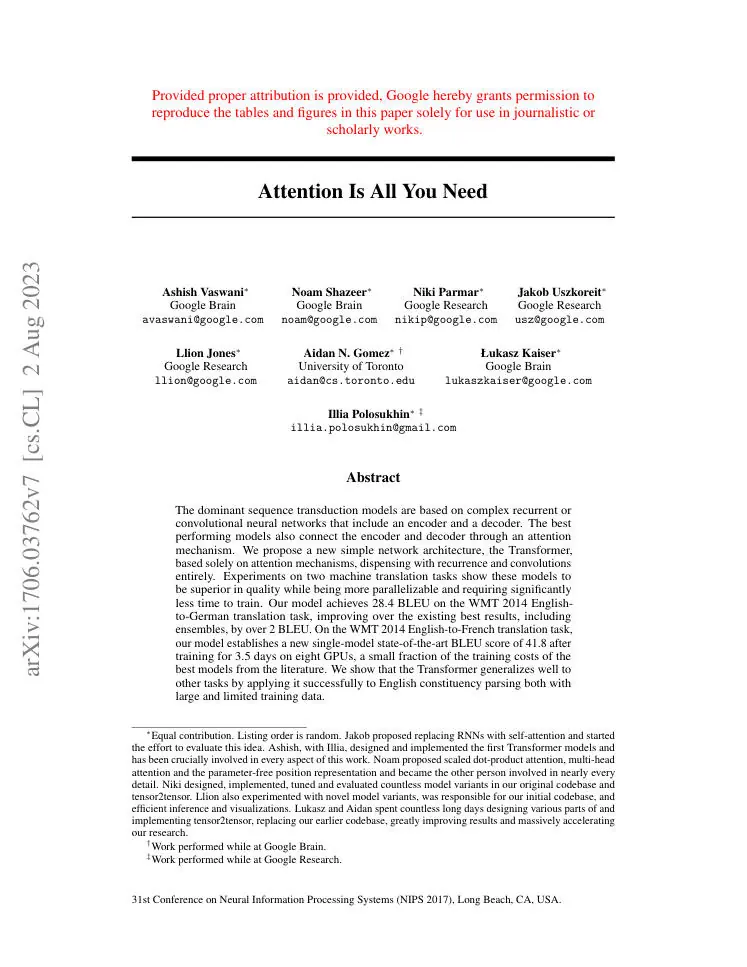
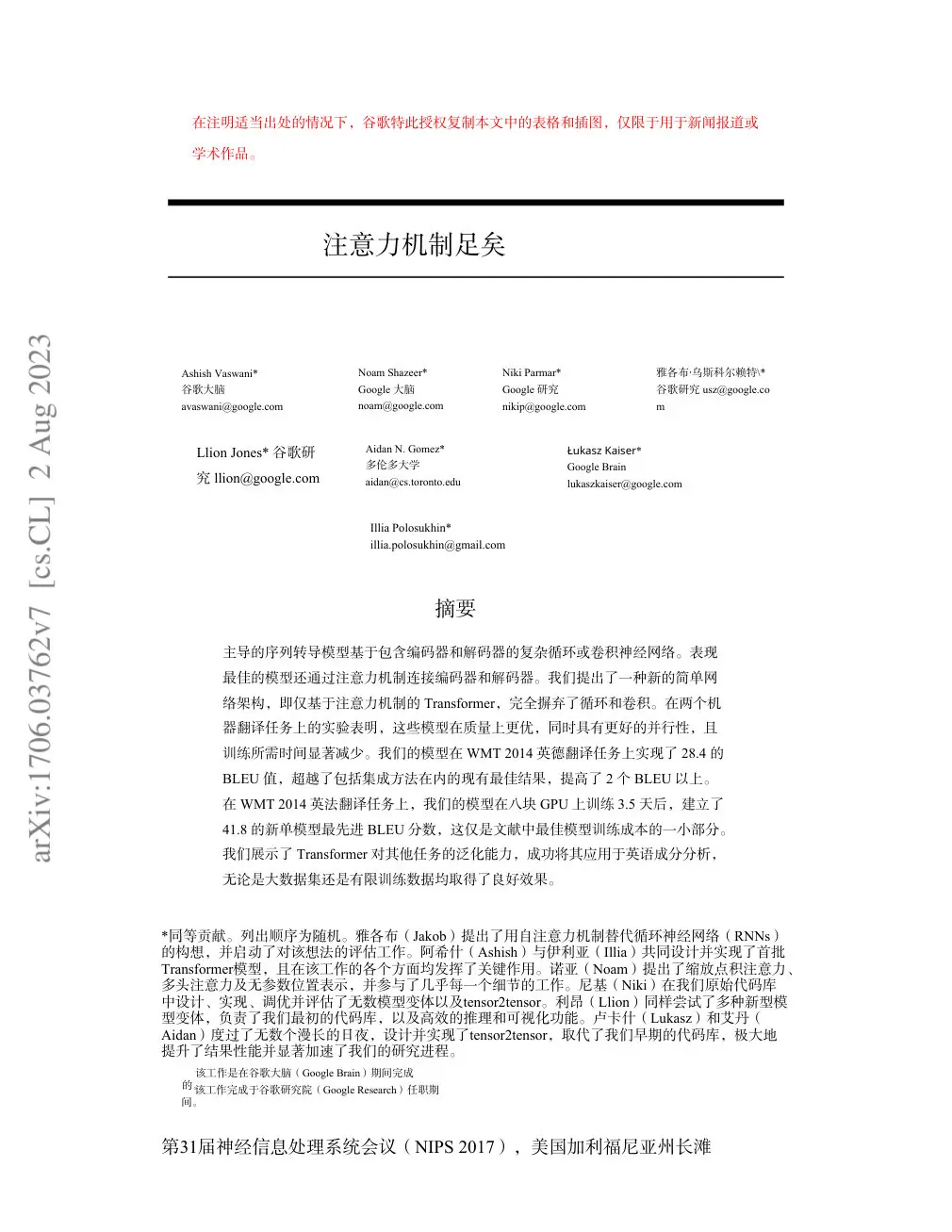
After the FAQ: original English page 1 of Vaswani et al. 2017 next to a layout-preserving translation. Pagination and figures stay aligned.
Frequently asked questions
Does KolmoPDF use my PDFs to train AI models?
No. KolmoPDF does not use uploaded PDFs, extracted text, prompts, translations, or other generated results to train its AI models or send that content to any third-party platform.
Which languages are supported?
English, Simplified Chinese, Japanese, Korean, French, German, Spanish, Russian, and Portuguese — any pair among the 9. Translate PDF to English is the most used pair.
How much per page?
Layout-preserving translation costs 2 credits per page, the same regardless of language pair. New accounts get free credits on signup.
Are formulas preserved?
Yes. Inline and display equations are restored in LaTeX form in the translated PDF.
Can I translate a scanned PDF?
Yes. Scanned pages are read with the same vision model used for PDF to Markdown, then translated with layout reconstruction — the translate scanned PDF workflow.
Will I keep formatting / keep layout / preserve format?
That is the point of this translator. Headings, tables, multi-column order, and equations stay in place instead of becoming a reflowed text file.
How is this different from Google Translate or DeepL?
Those tools optimize for raw text accuracy. KolmoPDF optimizes for document fidelity — pagination, tables, and math — which is what technical reviewers actually need.
Layout-preserving PDF translation, same paper
English source page on the left, Chinese translation on the right — pagination, headings and figures stay aligned. This is the real output of KolmoPDF’s PDF translator, not a restyled screenshot.