PDF to Markdown Converter — Tables, Formulas & Code Preserved
Convert PDF to clean Markdown online — formulas, tables, multi-column layouts, and optional multi-language translation
Upload PDF File
Drag & Drop files here, or
PDF only, Max 300MB, Max 800 pages
Your files are protected with strict privacy safeguards. Privacy policy
Settings
Points Deduction Info
- • PDF to Markdown:2 pts/pg
- • PDF to Markdown+MD Translation:3 pts/pg
How PDF to Markdown conversion works
KolmoPDF uses a Visual Language Model (VLM) to analyze PDF pages and output structured Markdown that preserves the semantic content of the document.
What the parser handles
- Multi-column layouts: Pages with two or more columns are read in the correct logical order, not left-to-right across the physical page.
- Mathematical formulas: Inline and display math is output as LaTeX within the Markdown, for example
$E = mc^2$or$$\int_0^\infty e^{-x^2} dx$$. - Tables: Tables can be output as Markdown tables or preserved as images. The experimental cross-page table merge feature detects and merges tables that span page breaks.
- Code blocks: Source code and technical notation is wrapped in fenced code blocks with language hints where detectable.
- Translation: Enable translation to convert document content into Chinese, Japanese, Korean, French, German, Spanish, or Russian during parsing. Adds 1 credit/page.
File limits
PDF files only. Maximum file size: 300 MB. Maximum page count: 800 pages.
What this PDF to Markdown converter does
KolmoPDF parses technical PDFs into structured Markdown using a Visual Language Model trained on academic papers, technical books, and engineering documents. It preserves multi-column reading order, recognizes LaTeX formulas inline and in display form, reconstructs tables that span page breaks, and keeps code blocks intact. Output is clean Markdown that flows into static-site generators, knowledge bases, and downstream translation pipelines.
Key capabilities
- Inline and display-form LaTeX formula recognition with multi-line support.
- Stable detection of merged-cell tables and tables that continue across pages.
- Two-column and three-column page layouts reordered into linear reading flow.
- Code block detection with language hints where the source is identifiable.
- Optional one-pass translation into 9 target languages during parsing.
Common use cases
Researchers use it to extract LaTeX from papers for note-taking systems. Engineering teams pipe extracted Markdown into Confluence, Notion, or internal wikis. Localization teams feed the Markdown into translation memory tools. Educators rebuild slides and study materials from textbook PDFs without retyping equations. AI teams convert PDF libraries to Markdown as the ingestion step for RAG pipelines and LLM fine-tuning corpora.
How to convert a PDF to Markdown
Converting a PDF to Markdown takes under a minute:
- Upload your PDF — native or scanned, up to 300 MB. No installation required; the converter runs entirely in your browser.
- Choose options: keep the original language, or translate to English, Chinese, Japanese, Korean, French, German, Spanish, Russian, or Portuguese in the same pass.
- Parsing runs page by page. Multi-column layouts, formulas, tables, and code blocks are detected automatically — nothing to configure.
- Download the result as a .md file, or copy the Markdown straight into Obsidian, Notion, a Git repository, or your RAG ingestion pipeline.
Why convert PDF to Markdown for LLMs and RAG?
PDF is a layout format, not a content format — raw extracted text scrambles reading order, drops table structure, and turns equations into garbage characters. Markdown is the format LLMs handle best: heading hierarchy becomes chunking boundaries, tables stay machine-readable, and LaTeX formulas remain meaningful tokens. If you are preparing documents for Claude, ChatGPT, or a vector database, converting PDF to clean Markdown first measurably improves retrieval quality and answer accuracy. KolmoPDF also exposes this converter as a developer API for batch processing.
PDF to Markdown converter vs. copy-paste or Pandoc
Copy-pasting from a PDF loses structure entirely and mangles multi-column pages. Pandoc is excellent for many formats but does not perform OCR or layout analysis, so PDF input generally fails on scanned files, complex tables, and math. Rule-based extractors handle simple single-column text but break on the technical documents that matter — papers, manuals, textbooks. A Visual Language Model reads each page the way a human does, which is why KolmoPDF holds structure where rule-based converters drop it.
OCR PDF to Markdown and PDF tables
OCR PDF to Markdown is the same upload — scanned pages do not need a separate OCR product. PDF table to Markdown reconstructs merged cells and tables that continue across page breaks as GitHub-flavored pipe tables, not as a screenshot.
Extract text from PDF, PDF to text, and OCR PDF
People searching extract text from pdf, pdf to text, or ocr pdf usually want the words out of a file. A classic pdf to text dump throws away reading order, tables, and math. KolmoPDF still OCRs a scanned PDF, but the output is structured Markdown: headings, pipe tables, and LaTeX instead of a wall of plain text. Use this page when you need extract text from pdf for notes, RAG, or editing — not when you only want a .txt of a one-column flyer (any free extractor will do).
Worked example on this page
After the FAQ: the actual Markdown KolmoPDF produced from Vaswani et al. 2017 (two-column paper, display math, results table). Download the same test PDF and parsed .md — this is not a mock.
Frequently asked questions
Does KolmoPDF use my PDFs to train AI models?
No. KolmoPDF does not use uploaded PDFs, extracted text, prompts, translations, or other generated results to train its AI models or send that content to any third-party platform.
Does it work on scanned PDFs?
Yes. The Visual Language Model treats text as image regions, so both native and scanned PDFs are parsed the same way — no separate OCR step needed.
How much does it cost per page?
PDF parsing is 2 credits per page; parsing with inline translation is 3 credits per page. New users receive 300 free credits on signup, so you can convert PDF to Markdown free before deciding to upgrade.
What is the maximum file size?
Free and paid plans accept files up to 300 MB. Page count limits depend on your remaining credit balance.
Does the converter keep images from the PDF?
Yes. Figures and images are extracted and referenced from the Markdown output, so converting a PDF to Markdown with images intact works out of the box.
Can I convert PDF to Markdown for Claude, ChatGPT, or a RAG pipeline?
That is one of the most common uses. Clean Markdown with real heading structure chunks better in vector databases and reads better as LLM context than raw PDF text extraction. For batch conversion, use the developer API.
How is this different from pdf2md or other free online converters?
Most free converters are rule-based text extractors: fine for simple one-column text, unreliable for multi-column layouts, merged-cell tables, LaTeX math, and scanned pages. KolmoPDF uses a Visual Language Model trained on technical documents, so exactly those hard cases are what it is built for.
Is there an API for PDF to Markdown conversion?
Yes. The same parser is available as a REST API with per-page pricing — see the API documentation for endpoints, code samples, and rate limits.
What Markdown flavor does the output use?
GitHub-Flavored Markdown (GFM): standard headings, pipe tables, fenced code blocks, and LaTeX math inside $ and $$ delimiters — compatible with Obsidian, Notion import, MkDocs, and most static-site generators.
Can I OCR a PDF to Markdown?
Yes. Scanned PDFs go through the same parser — OCR PDF to Markdown does not require a second tool.
Does it convert a PDF table to Markdown?
Yes. Merged cells and cross-page tables become GFM pipe tables instead of images.
Can I extract text from a PDF here?
Yes. Extract text from pdf is the same upload as PDF to Markdown. You get structured Markdown (headings, tables, formulas), not a flattened .txt.
Is this a PDF to text converter?
It covers the pdf to text job, but the file you download is Markdown. For a simple digital flyer, a free pdf to text tool is enough. For papers, scans (ocr pdf), and multi-column pages, Markdown keeps structure that plain text throws away.
How do I OCR a PDF online?
Upload a scanned PDF on this page. OCR PDF runs in the same Visual Language Model pass — no Adobe text layer, no second OCR app. The result is Markdown you can edit or feed to an LLM.
Real parse: Attention Is All You Need
This is the actual Markdown KolmoPDF produced from Vaswani et al. 2017 — a two-column academic PDF with display math and a results table. Not a mock, not a screenshot of the product UI.
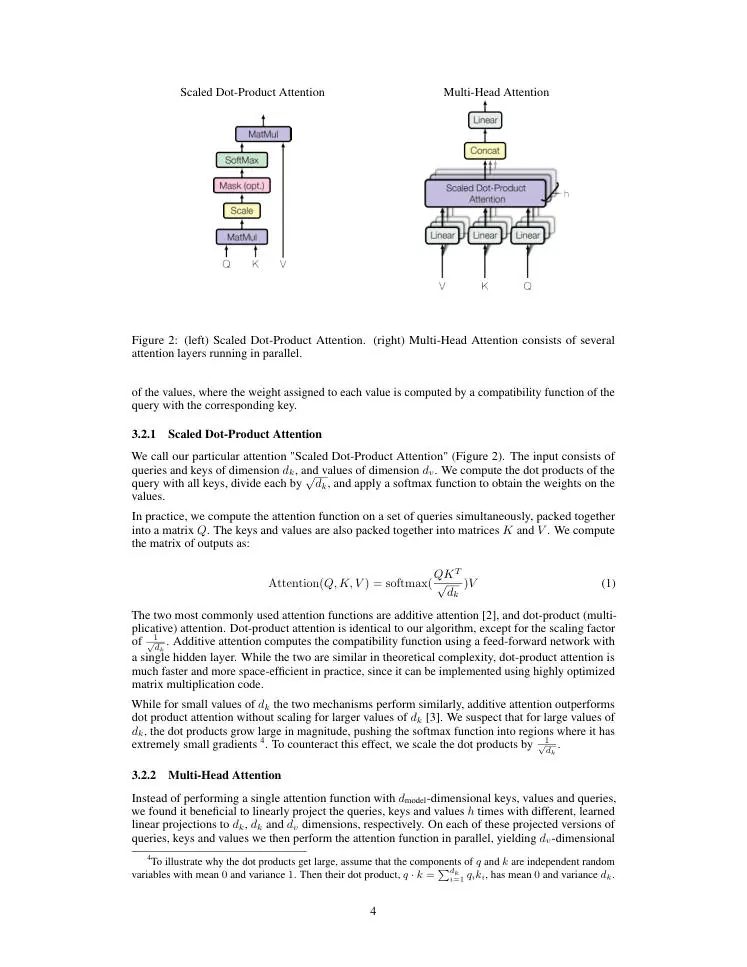
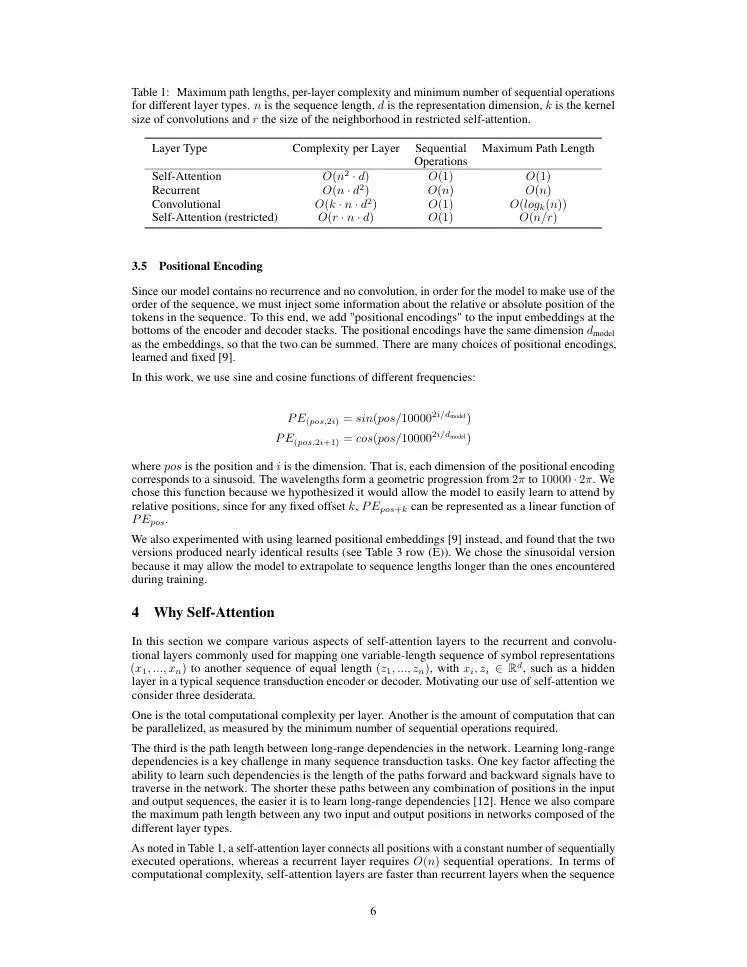
Equation 1 as extracted LaTeX
$$
\text{Attention}(Q, K, V) = \text{softmax}(\frac{QK^T}{\sqrt{d_k}})V
$$
Table 1 as a GitHub-flavored Markdown table
| Layer Type | Complexity per Layer | Sequential Operations | Maximum Path Length |
| :--- | :---: | :---: | :---: |
| Self-Attention | $O(n^2 \cdot d)$ | $O(1)$ | $O(1)$ |
| Recurrent | $O(n \cdot d^2)$ | $O(n)$ | $O(n)$ |
| Convolutional | $O(k \cdot n \cdot d^2)$ | $O(1)$ | $O(log_k(n))$ |
| Self-Attention (restricted) | $O(r \cdot n \cdot d)$ | $O(1)$ | $O(n/r)$ |
The dominant sequence transduction models are based on complex recurrent or convolutional neural networks that include an encoder and a decoder. We propose a new simple network architecture, the Transformer, based solely on attention mechanisms, dispensing with recurrence and convolutions entirely.