How to Convert PDF to Markdown with Tables, Formulas & Two-Column Layouts (2026)
KomoAI LLC · Updated · First published · 3 min read
The short answer: Standard PDF text extractors flatten tables, scramble two-column reading order, and turn equations into broken symbols. To convert a technical or academic PDF into clean Markdown with LaTeX math ($...$ / $$...$$), GFM pipe tables, and intact footnotes, upload it to a vision-based parser such as KolmoPDF PDF to Markdown—then import the .md directly into Obsidian, Notion, a RAG vector database, or Markdown to Word.
Try it on a real file: Open KolmoPDF PDF to Markdown and test on our public benchmark PDF (original.pdf) or inspect the parsed Markdown output.
Why Copy-Paste and Basic Extractors Break Technical PDFs
A PDF stores visual drawing instructions (glyph coordinates on a canvas), not semantic paragraphs, tables, or LaTeX trees. When a basic tool dumps the text layer, four things break immediately:
- Two-column reading order interleaves: Line 1 of the left column merges directly into Line 1 of the right column.
- Formulas degrade into symbol soup: Fractions, integrals, subscripts, and Greek letters flatten into strings like
Attention(Q,K,V ) = softmax( QKT√dk )V. - Tables lose row/column alignment: Merged headers and multi-page tables collapse into unreadable single lines.
- Footnotes and running headers pollute paragraphs: Page numbers and bottom footnotes get spliced into the middle of sentences.
A Visual Language Model (VLM) parses each rendered page the way a human reader does—separating columns, isolating equations, reconstructing table grids, and ignoring page furniture.
Real Output Example: Attention Is All You Need (Pages 4 & 6)
Below are pages 4 and 6 of Vaswani et al. (2017) alongside the actual Markdown generated by KolmoPDF:
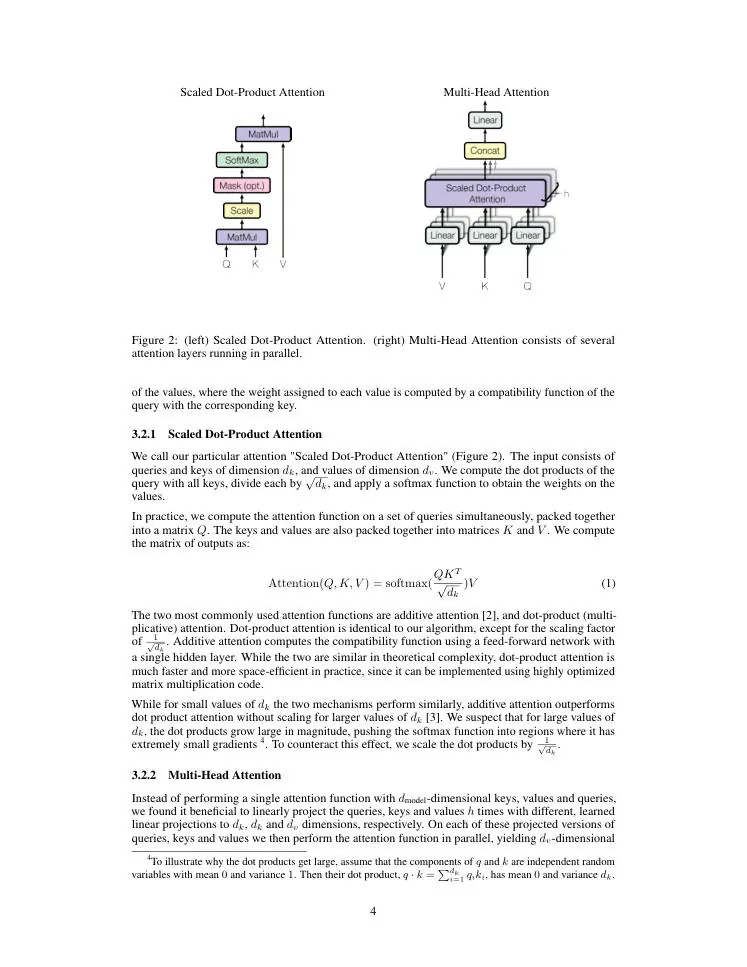
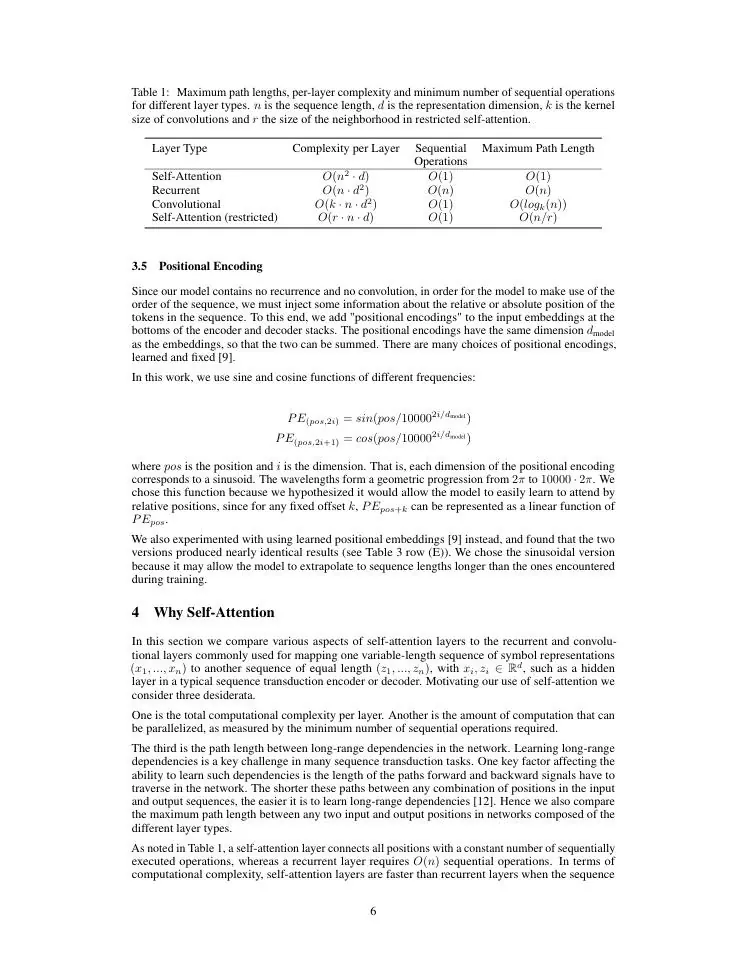
Formula recognition output ($$ display math):
$$
\text{Attention}(Q, K, V) = \text{softmax}(\frac{QK^T}{\sqrt{d_k}})V
$$
PDF table to Markdown output (GFM pipe table):
| Layer Type | Complexity per Layer | Sequential Operations | Maximum Path Length |
| :--- | :---: | :---: | :---: |
| Self-Attention | $O(n^2 \cdot d)$ | $O(1)$ | $O(1)$ |
| Recurrent | $O(n \cdot d^2)$ | $O(n)$ | $O(n)$ |
| Convolutional | $O(k \cdot n \cdot d^2)$ | $O(1)$ | $O(log_k(n))$ |
| Self-Attention (restricted) | $O(r \cdot n \cdot d)$ | $O(1)$ | $O(n/r)$ |
You can download the complete parsed file (original.md) to inspect every section, equation, footnote, and table.
Step-by-Step: Convert PDF to Markdown for Obsidian, RAG, or Word
1. Upload and Configure Conversion Options
- Open PDF to Markdown and upload your native or scanned PDF (up to 300 MB and 800 pages).
- Choose table output: Keep Markdown pipe tables for editable Obsidian/Git/RAG tables, or switch to image tables if a page contains ultra-dense visual charts you prefer preserved verbatim.
- Choose formula delimiters: Use
$/$$for Obsidian, GitHub, Notion, and KaTeX, or\[...\]if your downstream LaTeX processor prefers bracket delimiters. - Optional one-pass translation: Need the Markdown in another language? Select any of the 9 supported languages (or bilingual output) during the same parse.
2. Import into Obsidian, Notion, or a RAG Pipeline
- Obsidian / Zettelkasten: Drop the
.mdfile and extractedfigures/folder into your vault. Headings (#/##/###),$...$inline math,$$...$$display blocks, and GFM tables render natively with zero plugins. - RAG & LLM Ingestion: Clean
#/##heading hierarchy gives semantic text splitters (MarkdownHeaderTextSplitterin LangChain or LlamaIndex) exact section boundaries so tables and equations stay intact inside chunks. For automated folders, use the PDF Parsing API or Python pipeline guide.
3. Export Clean Markdown to Word (.docx) or Typeset PDF
Need to share your parsed notes with reviewers who require Microsoft Word?
- Upload the
.mdto Markdown to Word to generate a real.docxwith native Heading 1–6 styles (working Navigation Pane and Table of Contents), native Word tables, monospace code blocks, and rendered equations. - Or use Markdown to PDF to compile a clean, single-column typeset PDF without installing Pandoc or LaTeX locally.
Scanned PDFs and Long Documents
- Scanned PDFs (no text layer): Because KolmoPDF’s VLM reads page images directly, you do not need a separate OCR step—scanned books and legacy papers follow the exact same upload path.
- Pricing & Privacy: Parsing costs 2 credits/page (3 credits/page with simultaneous translation). New accounts start with 300 free credits (150 pages) plus 50 daily check-in credits, and PAYG packs are $3 per 1,000 credits. Uploaded PDFs are never used for AI model training (Security policy).
FAQ
Does it preserve inline math inside tables and footnotes?
Yes. As shown in Table 1 above, inline $O(n^2 \cdot d)$ expressions stay intact inside GFM table cells, and footnotes are extracted cleanly without interrupting paragraph flow.
Which converter comparison should I read before choosing? See our 10-tool benchmark comparison of PDF to Markdown converters covering KolmoPDF, Docling, Marker, MinerU, Mathpix, LlamaParse, PyMuPDF4LLM, and MarkItDown.
Can I translate the PDF with its original PDF layout instead of converting to Markdown? Yes—use Translate PDF or read how to translate a PDF while keeping formulas and layout.